
Project summary
At Endgame I’ve led the overall architecture of the frontend web application. Endgame pulls in data from the tools sales teams already use, like Salesforce and Gong call recordings, so its AI agent can answer questions about accounts, deals, and people.
For this project we built a streaming chat rendering system, which took the product from a conventional text-based AI chat interface to an extensible rich-output surface.
The system rendered streaming Markdown responses from Endgame’s agent while also supporting custom embedded UI components such as interactive data visualizations and stakeholder/person cards as well as interactive forms to save updates back to Salesforce.
A major design goal of mine was to allow the agent experience to grow beyond prose over time without turning the chat renderer into a collection of brittle one-off implementations. This required solving problems across streaming rendering, custom Markdown syntax, client-side component architecture, debugging tooling, validation, and consistent API contracts between the Python agent/backend and TypeScript frontend.
The problem
Endgame’s product increasingly relied on an AI agent to synthesize and present complex sales intelligence. In early 2025 the agent's answers rendered as plain Markdown, and the user waited on a loading state until the whole answer was done.
Plain text and conventional Markdown were useful for narrative responses, but they were limiting for information that was inherently structured or visual, including:
- Data visualizations
- Stakeholder/person information
- Other interactive or application-specific UI
- Structured artifacts produced during agent execution
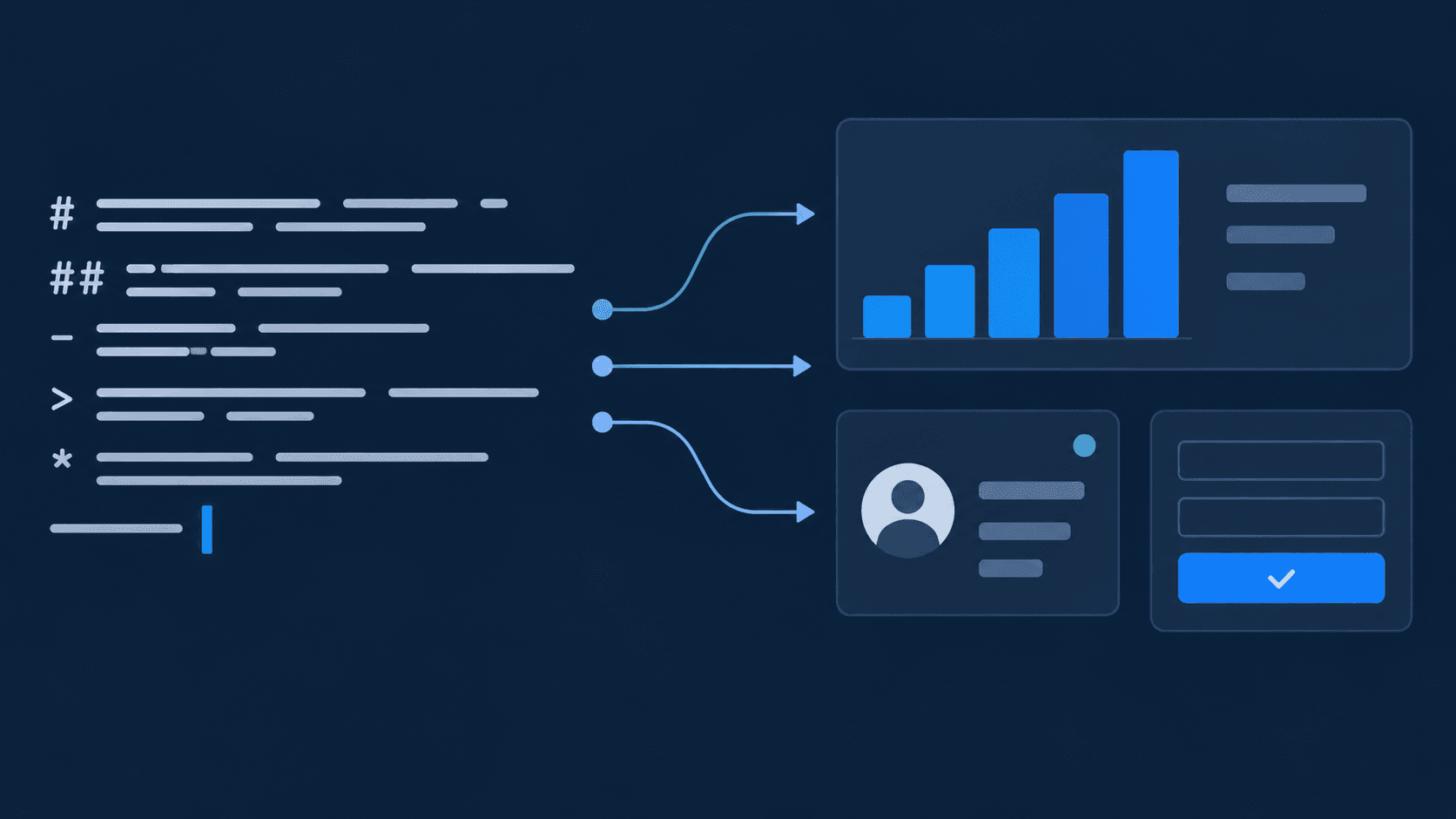
I proposed that the agent's Markdown could be more than walls of text. The output itself could act as an extensible interface: normal Markdown would render conventionally, while specific custom constructs could resolve into richer React components.
I turned that into a streaming surface where the agent can drop live product UI right into its prose, and it kept being extended over the following year as teammates added new features. This made chat a first-class product surface rather than simply a text transcript.
How it works
An answer travels from the LLM service, through the webapp API, to the browser, where it's typed out and rendered as Markdown with live components mixed in:

Markdown with an allowlist of components
The core idea: normal Markdown renders normally, and a short list of HTML-style tags turns into React components. The agent writes ordinary Markdown, including the GitHub-flavored extras like tables and task lists, with custom tags mixed in wherever a plain sentence isn't enough:
## Sterling Systems is ready for a proposal
Weighted pipeline has nearly **tripled** since the September kickoff, with the
steepest jump after the *executive alignment call*<citations data-spans="1:2">1</citations>.
<chart path="org=…/thread=…/message=…/artifact=pipeline-trend"></chart>
### The buying committee
<Person id="person_123">Rachel Menken</Person> is the executive sponsor at
<Account id="account_123">Sterling Systems</Account>. She asked for one
narrative the CFO could repeat<citations data-spans="1:4,5">1</citations><citations>2</citations>.
| Stakeholder | Signal | Move |
| ----------- | ------- | ----------------------------- |
| Executive | Urgency | Give them the narrative |
| Finance | Risk | Show payback in under a year |
> If the story needs three meetings to explain, it is not a story yet.
### Plan for Friday
1. Open with the pipeline trend.
2. Walk finance through the `payback_months` model.
3. Send the [workshop agenda](https://example.com/agenda) the day before.
- [x] Confirm the executive sponsor
- [ ] Turn the workshop into a signed proposal
<callout type="warning" label="Finance bar">Payback must land under twelve months<citations data-spans="3:1">3</citations>.</callout>
<sfdcupdateform artifact="sfdc-updates"></sfdcupdateform>
Citations point back to evidence. The number refers to one of the message's sources (a call, an email, a web page), and data-spans lists the exact quoted passages inside it, so 1:4,5 means passages 4 and 5 of source 1. Hovering the badge shows those passages. When a sentence piles up more than three citations, the extras collapse into a citation-group badge that reads "+2 more".
Tags like chart and sfdcupdateform point at artifacts: larger pieces of structured output, like a chart's data or a set of proposed Salesforce changes, that the agent saves as JSON alongside the message.
On the client, rehype-raw parses the tags, rehype-sanitize throws away anything not on the allowlist, and react-markdown maps each allowed tag to a component:
const MARKDOWN_SANITIZE_SCHEMA = {
  ...defaultSchema,
  tagNames: [
    ...defaultSchema.tagNames,
    "person", "personcard", "account", "citations", "citation-group",
    "callout", "chart", "slidedeck", "file", "sfdcupdateform",
  ],
  attributes: {
    ...defaultSchema.attributes,
    "*": [...defaultSchema.attributes["*"], "path", "artifact"],
    person: ["id"],
    account: ["id"],
    citations: ["dataSpans"], // data-spans, camelCased by the HTML parser
    callout: ["label", "type"],
  },
};

<ReactMarkdown
  remarkPlugins={[remarkGfm]}
  rehypePlugins={[rehypeRaw, [rehypeSanitize, MARKDOWN_SANITIZE_SCHEMA]]}
  components={{
    person: Person,
    personcard: PersonCard,
    account: Account,
    citations: Citations,
    "citation-group": CitationGroup,
    callout: Callout,
    chart: ArtifactComponent,
    sfdcupdateform: ArtifactComponent,
  }}
>
  {content}
</ReactMarkdown>
We had originally started building with MDX, which compiles Markdown with JSX. At first it felt like a natural choice because the original purpose of MDX is to render custom JSX components within markdown. However, it had to compile on the server, and it crashed whenever a tag wasn't perfectly formed (or partially written by a streaming LLM response). LLMs produce imperfect tags all the time. After two weeks of getting fed up trying to wrestle the LLM into always writing correct MDX, we switched to client-side rendering with react-markdown and a special allowlist for custom tags. The allowlist approach degrades gracefully: an unknown or broken tag just doesn't render, and the rest of the answer is fine.
Streaming
The agent runs in an LLM Python service owned by another team, as a background job that saves the in-progress message to a Firestore document. That service doesn't stream word by word. Its stream endpoint checks the document about once a second and sends the whole message whenever it changes. The pace comes from Firestore itself, which supports roughly one sustained write per second per document, so the job batches its updates to match.
There was a reason it had to work this way. The model doesn't write final citations or entity tags. It writes placeholders that point at evidence from its tool calls, and the service rewrites them as the answer streams: it numbers the sources, drops citations that point at evidence that doesn't exist, groups long runs of citations, and turns generic entity tags into person or account tags. That rewrite needs evidence only the server has, and it changes text that was already sent. A word-by-word stream can't express edits to earlier text. Sending the whole message every time can.
On the webapp side, I put a tRPC subscription over server-sent events in front of it, even though upstream was really polling a document. The service's own code calls that polling "fake it until you make it," and the proxy keeps the faking out of sight: the browser gets a real stream, and how the data is produced stays an implementation detail behind the proxy. If the LLM service ever streamed natively, only the proxy would need to change, not the frontend. It buffers chunks until they parse, validates them, and yields each snapshot:
async *streamMessage(threadId, messageId, signal) {
  let buffer = "";
  for await (const chunk of llmServiceStream) {
    buffer += chunk.toString();
    let parsed;
    try {
      parsed = JSON.parse(buffer);
    } catch {
      continue; // partial chunk, keep buffering
    }
    const message = threadMessageSchema.parse(parsed);
    yield message;
    if (["completed", "failed", "cancelled"].includes(message.status)) return;
    buffer = "";
  }
}
The client subscribes and patches the message in the React Query cache, so every component already reading that thread updates on its own:
trpc.threads.streamThreadMessage.useSubscription(
  { threadId, messageId },
  {
    enabled: isStreamable(message),
    onData: (snapshot) => updateMessage(snapshot.id, snapshot),
    onError: () => triggerRetryQueue(),
  },
);
The limitation: updates arrive in uneven chunks, about once a second, and every update resends the whole message. In exchange, the client stays simple. Each snapshot replaces the last, and because generation runs separately from the connection, a dropped connection resubscribes and picks up the current state.
The typewriter
Those once-a-second snapshots set up the typewriter's job. Left alone, the answer would pop in as big, uneven chunks, a sentence here and a whole paragraph there, which is jarring to read. The typewriter makes it read like normal LLM streaming instead. New text is revealed about one character every 10ms, with a blinking cursor at the end, which smooths over the gaps between snapshots. If a lot of text arrives at once, it speeds up so it never takes more than 3 seconds to catch up:
const idealCompletionTime = 3000;
const interval = 10;
const contentLengthDifference = currentContent.length - lastRenderedChunkIndex;
const expectedCompletionTime = contentLengthDifference * interval;

let chunkSize = 1;
if (expectedCompletionTime > idealCompletionTime) {
  chunkSize = Math.ceil(expectedCompletionTime / idealCompletionTime);
}
When text changes somewhere other than the end, for example when citations get added, it shows that change immediately instead of retyping the whole answer.
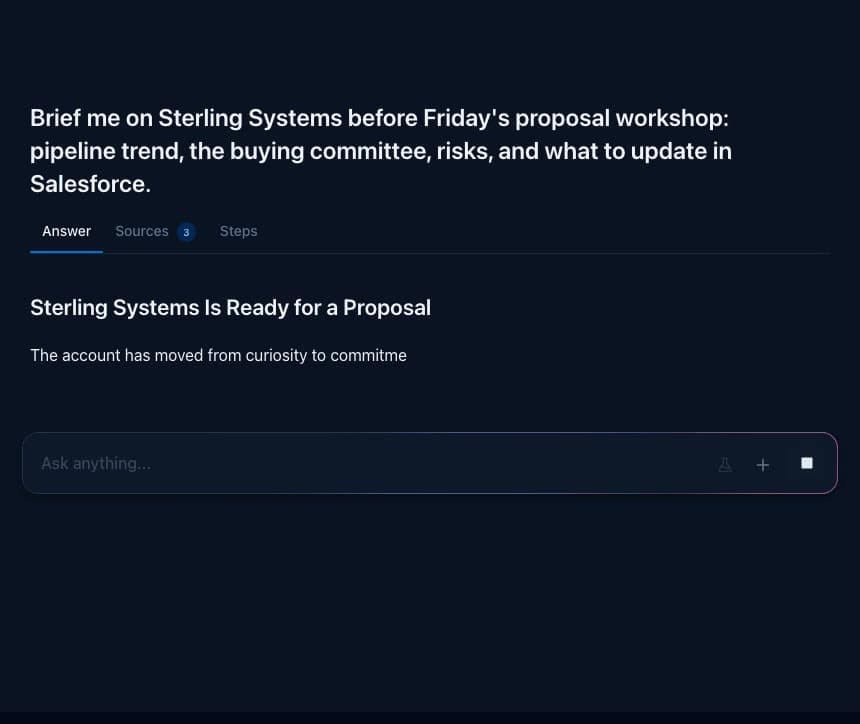
A fun side effect: while a component tag is still being typed out, it shows on screen as raw text for a moment before snapping into a chart or a card. I kept it as an intentional design choice. Not only does it remove the need to add complex validation around incomplete tags, it also offers a quick glimpse at the machinery underneath, like the translucent cases on old Macs that let you see the insides. Endgame’s engineering ability is part of the brand, so giving a peak into that helps demonstrate some of the “movie magic” behind it.
Scrolling while streaming
Scroll handling uses Motion's scroll tracking (the library formerly called Framer Motion) instead of plain scroll event listeners. While an answer streams, the page is already re-rendering many times a second as text arrives, and scroll events fire on every frame. Keeping scroll position in React state would stack a second stream of re-renders on top of the first.
Motion keeps scroll position in a motion value, which updates outside React's render cycle and is synced to animation frames. The page container creates one useScroll tracker and shares it through context, so every part of the thread reads the same value instead of attaching its own listener. Components subscribe to changes and only touch React state when something meaningful changes:
// One scroll tracker for the whole page, shared through context
const scrollState = useScroll({ container: scrollContainer });

// The thread only re-renders when "near the bottom" flips, not on every frame
useMotionValueEvent(scrollState.scrollY, "change", (scrollY) => {
  const { scrollHeight, clientHeight } = scrollContainer.current;
  setIsAboveBottom(scrollHeight - scrollY - clientHeight >= SCROLL_THRESHOLD_PX);
});
If you scroll up to reread something, a "scroll to bottom" button appears instead of the page yanking you back down.
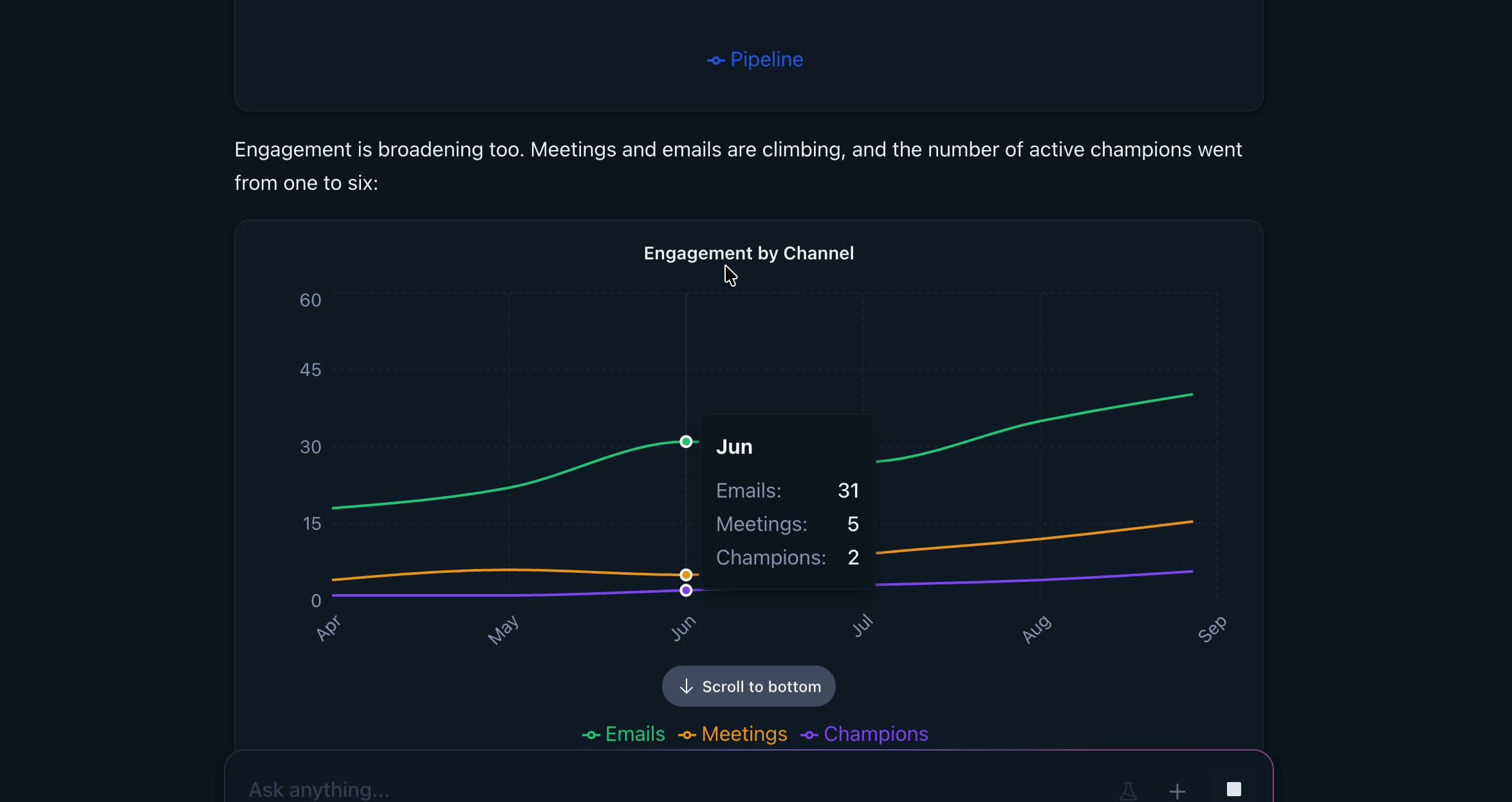
The same API drives the sticky question header. Given a target element and a scroll range, useScroll reports progress as the full question scrolls up under the top bar. Once it's past, the header swaps to a compact one-line version:
const { scrollYProgress } = useScroll({
  container: scrollContainer,
  target: staticHeaderRef,
  offset: ["end end", `end ${stickyOffset + COMPACT_HEADER_HEIGHT}px`],
});

useMotionValueEvent(scrollYProgress, "change", (value) => {
  setIsScrolledPastTitle(Boolean(Math.floor(value)));
});
Describing the scroll range declaratively, instead of measuring element positions by hand on every scroll event, keeps the code short and stays correct while the content around it grows during streaming.
A new question pins to the top of the screen, and its answer gets at least 85% of the viewport height to stream into, so text grows downward into empty space instead of pushing what you're reading.
Components fetch their own data
The agent's text only carries IDs, so it never has to write out CRM data, and that data is always current. Person and account tags register their IDs with a batch provider. It removes duplicates and sends one request per 50 IDs, so an answer that mentions 30 people makes one call instead of 30:
// Server validates max 50 IDs per request.
const MAX_BATCH_SIZE = 50;

// Every <Person> tag calls register(id) while rendering. A microtask flushes
// all IDs from one render pass into a single state update.
const register = useCallback((id: string) => {
  if (collectedRef.current.has(id)) return;
  collectedRef.current.add(id);

  if (!flushScheduledRef.current) {
    flushScheduledRef.current = true;
    queueMicrotask(() => {
      flushScheduledRef.current = false;
      setPersonIds(Array.from(collectedRef.current));
    });
  }
}, []);

const queryResults = useQueries({
  queries: chunk(personIds, MAX_BATCH_SIZE).map((ids) => ({
    queryKey: ["persons", "getByPersonIds", { personIds: ids }],
    queryFn: () => client.persons.getByPersonIds.query({ personIds: ids }),
  })),
});
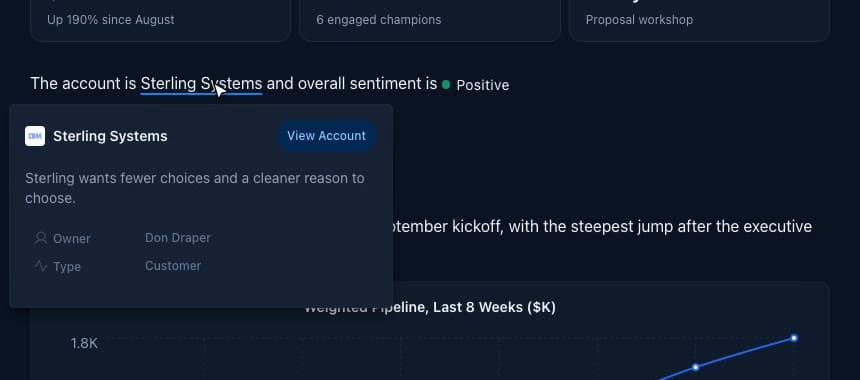
Artifacts like charts, slide decks, files, and the Salesforce form work the same way. The tag carries only the artifact's location, and one renderer fetches it and picks the right component for its type:
export const ArtifactComponent = ({ path, artifact }) => {
  const { messageId } = useMessageContext();
  const { threadId } = useParams();

  if (artifact) {
    return (
      <ArtifactRenderer
        path={`org=${orgId}/thread=${threadId}/message=${messageId}/artifact=${artifact}`}
      />
    );
  }
  return path ? <ArtifactRenderer path={path} /> : null;
};
Charts are the most common artifact. The agent describes the data and the chart type, and the chart renderer draws it with Recharts, themed to match the app in light and dark mode:
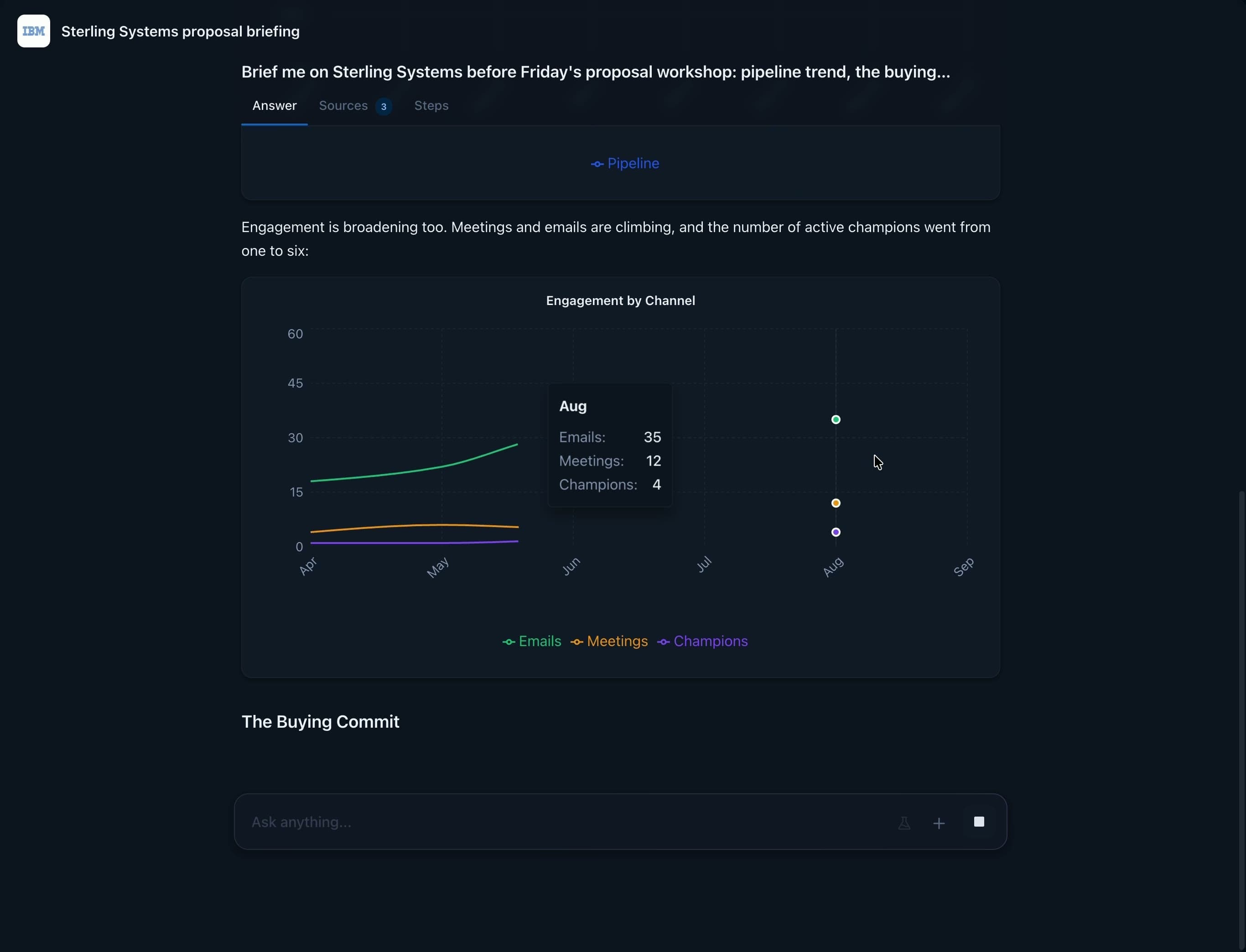
One chart schema from Python to the browser
Charts come from a data visualization skill. A skill is a document of instructions the agent reads when a question calls for it. This one describes Endgame's chart format, a custom spec built for Recharts rather than a standard like Vega-Lite. With those instructions loaded, the agent writes a short Python script that shapes the data and ends by returning a chart spec. A chart tool runs the script in a sandbox, saves the spec as an artifact, and the agent drops a chart tag pointing at it into the answer.
At first, nothing actually checked that spec. The format lived only as prose in the skill document, and the tool accepted anything roughly shaped like a chart. When the model wandered from the instructions, say by writing xField instead of xAxisKey, or type: "BarChart" instead of chartType: "bar", a normalizer in the tool guessed what it meant. The tool reported success, and the agent assumed its chart was fine. The only strict check was the hand-written Zod schema on the frontend, and that ran when someone opened the thread, long after the agent had moved on.
We sank a lot of time adjusting the skill's instructions to get the model to conform. But even when the model got it right, the three descriptions of a chart (the skill's prose, the tool's normalizer, and the frontend's schema) were maintained by hand, and they drifted apart. The normalizer, for example, wrote "options": null for charts without options, which the frontend schema rejected. At one point 21% of production chart artifacts failed to render.
The fix made a Pydantic model in the Python service the single, machine-checkable definition of a chart. The chart tool checks the agent's output against it before saving, so a bad chart goes back to the LLM as a specific error it can fix and retry, instead of getting saved and failing later in someone's browser:
class ChartSpec(BaseModel):
    type: Literal["chart"]
    chartType: Literal["bar", "line", "area", "pie", "scatter", "funnel", ...]
    title: str
    data: list[dict[str, Any]]
    xAxisKey: str
    series: list[SeriesSpec]

def _validate_chart_spec(chart_data: dict) -> tuple[ChartSpec | None, str | None]:
    try:
        spec = ChartSpec.model_validate(chart_data)
    except ValidationError as exc:
        # Returned to the LLM as a tool error so it can fix the spec and retry
        return None, _format_validation_error(exc)
    return spec, None
On the frontend, TypeScript types alone weren't enough. Artifacts are JSON loaded from storage at runtime, and TypeScript types disappear once the code is compiled, so nothing would stop a malformed chart from reaching the chart library and breaking it. That's what the Zod schema is for: it checks the data at runtime, right where it enters the webapp. The Pydantic models are published in the Python service's OpenAPI spec, and a code generator turns that spec into both the Zod schemas and the TypeScript types, so neither is written by hand. The webapp API parses every artifact with the generated schema before it reaches the browser:
public async getMessageArtifact(artifactPath: string) {
  const response = await this.fetchClient.get(`/message_artifacts/${artifactPath}`);
  // Generated from the Python service's Pydantic models via OpenAPI
  return llmServiceZod.zMessageArtifactResponse.parse(response.data);
}
If the data doesn't match, the artifact shows a friendly "couldn't load this" state and the error gets reported, instead of the whole answer breaking. The same generated types flow into the chart renderer's props and the Storybook mocks, which is what keeps those mocks in sync with production. After the fix, the chart failure rate went to zero.
export const trpcMsw = createTRPCMsw<AppRouter>({
  links: [httpLink({ transformer: superjson, url: "/api/trpc" })],
  transformer: { input: superjson, output: superjson },
});

// Mock data is typed by the real contracts: the artifact type comes from the
// API router's output, and ChartSpec is generated from the Python models.
type MessageArtifact = inferProcedureOutput<
  AppRouter["threads"]["getMessageArtifact"]
>;

const pipelineChart: ChartSpec = {
  type: "chart",
  chartType: "line",
  title: "Weighted Pipeline ($K)",
  data: [
    { week: "Sep 1", pipeline: 940 },
    { week: "Sep 8", pipeline: 1120 },
  ],
  xAxisKey: "week",
  series: [{ dataKey: "pipeline", name: "Pipeline" }],
};

const sampleArtifacts: Record<string, MessageArtifact> = {
  [artifactPath("pipeline")]: { type: "chart", data: pipelineChart },
};

export const AllRenderableElements: Story = {
  parameters: {
    msw: {
      handlers: [
        trpcMsw.persons.getByPersonId.query(({ input }) => ({
          ...mockPerson,
          id: input.personId,
        })),
        trpcMsw.threads.getMessageArtifact.query(
          ({ input }) => sampleArtifacts[input.artifactPath],
        ),
      ],
    },
  },
  args: { children: showcaseMarkdown },
};

The lesson I keep coming back to: LLMs do their best work when they can check it against strong types. Prose instructions tell a model what you want, but a schema it gets validated against tells it right away, and specifically, what it got wrong, and it usually fixes the mistake on the next try. The same types then protect every layer after it, from the API to the chart renderer to the Storybook mocks.
One Markdown source, several outputs
The agent writes one answer, and it has to work everywhere it ends up:
- In the app: every tag renders as its interactive component.
- In email digests: digests let a user schedule a prompt, like "summarize what changed on my top accounts this week", and get the agent's answer emailed to them on a regular cadence. I built the email service that renders those answers. Email clients are far more limited than browsers: many strip
<style>tags, ignore CSS variables, and run no JavaScript. So for email, the rendering pipeline adds a preprocessing step. The Markdown renders through the same allowlist idea, but into email-safe components from React Email. Then the HTML runs through Juice, which inlines every style onto its element and resolves CSS variables, so it looks right in Gmail and Outlook.
// Email-safe components: no interactive widgets, no links back into the app
const components: MarkdownComponents = {
  h1: (props) => <Heading as="h1" style={HEADING_STYLES} {...props} />,
  citations: () => null,
  // person and personcard render as their plain-text names
};

export async function renderEmail({ input }) {
  const html = await render(<TemplateComponent params={input.params} />);

  // Many email clients drop <style> tags and CSS variables,
  // so every style gets inlined onto its element.
  return juice(html, {
    removeStyleTags: true,
    resolveCSSVariables: true,
    applyWidthAttributes: true,
    applyAttributesTableElements: true,
    preserveMediaQueries: true,
  });
}
- In exports (PDF, docs): the tags are stripped and citations become numbered references.
# Remove Person and Account tags but keep the inner text
markdown_content = re.sub(r"<Account\b[^>]*>(.*?)</Account>", r"\1", markdown_content)
# Citations become bracketed numbers like [1, 3]
markdown_content = re.sub(r"<citations\b[^>]*>(.*?)</citations>", replace_citations, markdown_content)
- In publicly shared threads: sources are cleaned so internal details like quotes and file paths don't leak.
The Salesforce update form
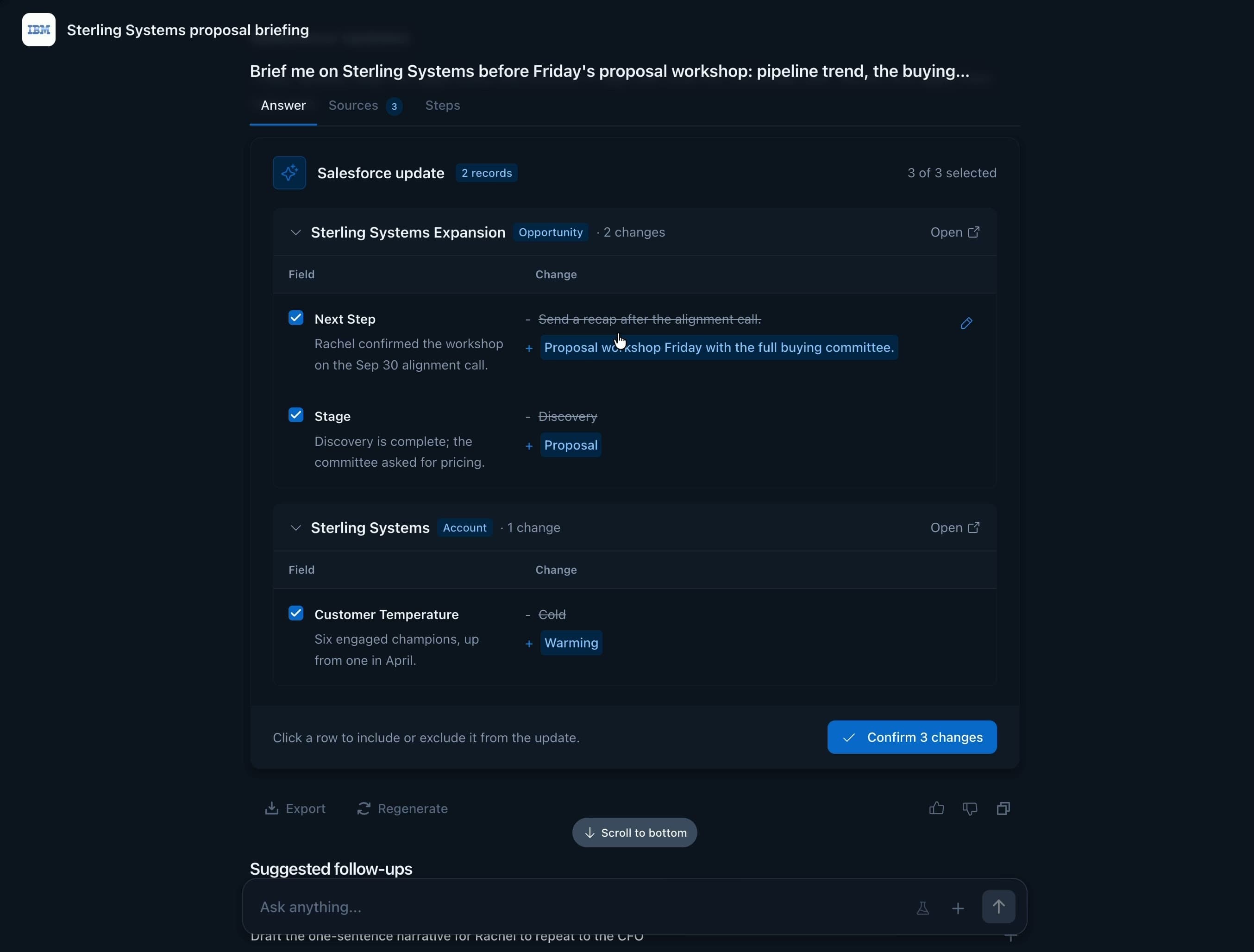
A lot of answers end with something the rep should change in their CRM. The Salesforce update form closes that loop inside the conversation. When the agent recommends a change, like moving an opportunity to a new stage or rewriting its next step, it writes an sfdcupdateform tag that points at an artifact. The artifact lists each record and field, the proposed value, and the agent's reasoning for it.
The form loads each field's current value live from Salesforce, so the rep sees a real before and after rather than just the agent's suggestion. Nothing is written until the rep confirms. Clicking a row includes or excludes that field, and clicking a proposed value opens an inline editor that matches the field's Salesforce type, built from Chakra UI components:
{isPicklist(field) ? (
  <NativeSelect.Root>{/* single choice from the field's picklist values */}</NativeSelect.Root>
) : isMultiPicklist(field) ? (
  <Combobox.Root multiple>{/* multi-select */}</Combobox.Root>
) : field.field_type === "boolean" ? (
  <Switch.Root />
) : field.field_type === "textarea" ? (
  <Textarea />
) : isNumericFieldType(field.field_type) ? (
  <NumberInput.Root />
) : field.field_type === "date" ? (
  <Input type="date" />
) : (
  <Input />
)}
Before anything is sent, each edited value is converted back into the shape Salesforce expects:
export function coerceForFieldType(field: WriteBackFieldShape, raw: unknown): unknown {
  if (isNumericFieldType(field.field_type)) {
    if (raw === "" || raw === null || raw === undefined) return null;
    const n = typeof raw === "number" ? raw : Number(raw);
    return Number.isFinite(n) ? n : null;
  }
  // Multi-select picklist values travel as ";"-joined strings in Salesforce
  if (isMultiPicklist(field)) {
    return Array.isArray(raw) ? raw.join(";") : (raw ?? "");
  }
  if (field.field_type === "boolean") return Boolean(raw);
  return raw ?? null;
}
After the rep confirms, the list of fields that actually saved is stored on the artifact, so reloading the thread shows the same success state instead of a fresh form. If the rep's Salesforce connection has expired, the error links straight to the settings page to reconnect, and it doesn't log them out of Endgame.
The form itself is a pure view: it takes the artifact data plus state and callbacks, and a separate container handles fetching and saving. That split made every state easy to cover in Storybook (loading current values, editing, submitting, error, done), and it lets the same view render outside Endgame's own chat, as an MCP App inside other AI chat clients.
Faster dev cycles with Storybook
Testing streaming chat output in the browser is slow. You have to craft a prompt that gets the LLM to produce the components you want to see, wait for it to do its research, and then wait for it to stream the answer. Running the real application also means starting every database (with realistic data) and several backend services, and it requires logging in, which we don’t want coding agents doing on their own.
Putting every component and a full example conversation into Storybook gives us consistent, easy-to-run examples of the interface in action. It also lets a coding agent test its own work and iterate quickly in the browser without running the dev stack. It can even take screenshots and add them to the PR. All the videos in this post were recorded from Storybook, and several were recorded automatically by a coding agent.
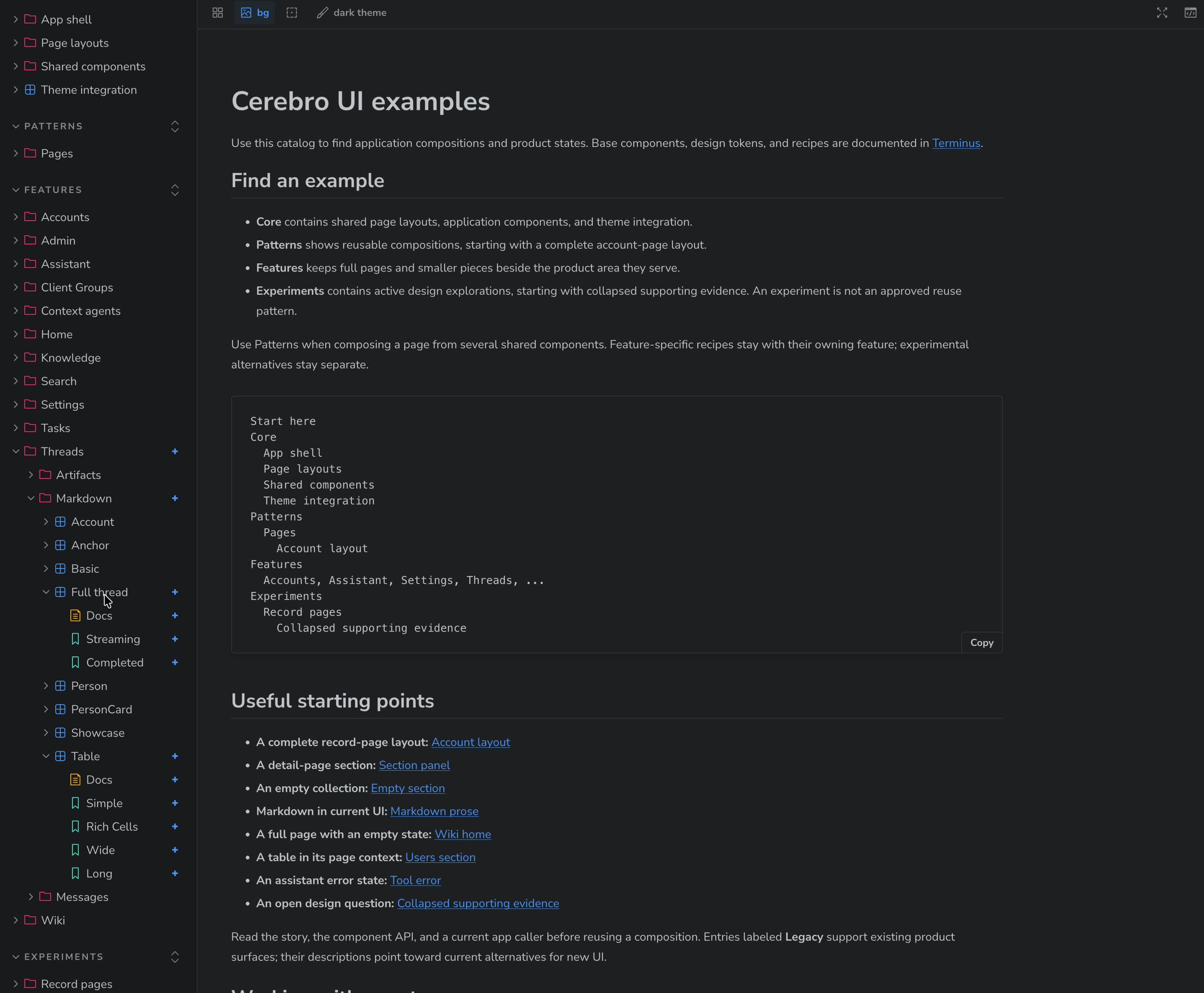
Components that fetch their own data are hard to build in isolation. I set up Mock Service Worker (MSW) with a type-safe tRPC adapter, so Storybook stories can fake real API responses. A single story can render every tag the agent knows, with realistic data:
Because the API is faked, a story can render the real, data-fetching component tree. We don’t have to maintain a separate presentational copy of each component just so Storybook can render it without data. That split is worth it for truly reusable components, but for one-off product UI it’s a lot of extra effort for little benefit.
Strong types around the data contracts kept the mocks honest. Every mock handler is checked against the real API's return type, and chart fixtures are typed with the schema generated from the Python service's models. If a production schema changes, for example a chart field gets renamed, the stories stop compiling instead of quietly showing data production would never send. The mocked data can't drift from the real production schemas.
The same setup made it possible to script a whole streaming conversation in Storybook, which is how the video at the top was recorded without exposing real customer data.
You can try it yourself in the live Thread UI Storybook. It includes the full thread (streaming and completed), the markdown tags, tables, charts, and the Salesforce form, all running on mocked data.
Lessons to take away
Assume the output can be wrong. A streaming response may contain an incomplete tag or an artifact that fails validation. The rendering layer should handle those cases locally: keep the surrounding answer readable and show a useful fallback for the part that cannot render. Graceful degradation belongs in the design from the start.
Define schemas once, then generate the rest. Keeping separate Python and TypeScript definitions invited drift. One source of truth, with generated types and runtime validators for each platform, gives the API, renderer, and test fixtures the same definition of valid data. It also gives the agent specific errors it can correct before saving an artifact.
Make the UI easy for people and agents to exercise. Realistic data and thorough Storybook coverage shorten the path from a code change to a visible result. Stories should cover individual states and complete flows, so a person can review the behavior and a coding agent can open the same examples, check its work, and iterate. The agent can also capture screenshots for the pull request description, giving the reviewer a concrete view of what changed.